A Custom HttpModule to Log Request Duration

My application has logging of fine-grained operations, but I want to see the duration of the entire web request. The idea is to start a Stopwatch on the BeginRequest event and then log the elapsed time on the EndRequest event. I started by modifying the Global.asax to wire this up, but quickly got turned off because I was violating the Open-Closed Principle. I really just want to bolt-in this behavior while I’m profiling the application and then turn it off when the kinks are worked out. IIS has a pretty slick extension point for this sort of thing that let’s you hook into the request lifecycle events.

public class RequestDurationLoggerModule : IHttpModule
{
    private const string ContextItemKey = "stopwatchContextItemKey";
 
    public void Init(HttpApplication application)
    {
        application.BeginRequest += (o, args) =>
        {
            application.Context.Items[ContextItemKey] = Stopwatch.StartNew();
        };
 
        application.EndRequest += (o, args) =>
        {
            var stopwatch = (Stopwatch)application.Context.Items[ContextItemKey];
            stopwatch.Stop();
 
            var logger = GetLogger(application);
 
            logger.Debug(
                "{0} -> [{1} ms]",
                application.Context.Request.RawUrl,
                stopwatch.ElapsedMilliseconds);
        };
    }
 
    private static ILogger GetLogger(HttpApplication application)
    {
        var serviceProvider = application as IServiceProvider;
 
        if (serviceProvider == null)
        {
            return new NullLogger();
        }
 
        return serviceProvider.GetService<ILogger>();
    }
 
    public void Dispose()
    {
    }
}
 

The only weird part here is getting a handle to the logger. I’m using an IoC container in my application, however I can’t tell IIS how to build up my RequestDurationLoggerModule, so I’m stuck using the Service Locator pattern. The container could be a singleton, but I don’t like singletons, so I implemented IServiceProvider in Global.asax instead. All that’s left now is wiring in the module. Since Cassini behaves like IIS6, you have to use the legacy style configuration, which looks like this:

  <system.web>
    <httpModules>
      <add name="..." type="MyApplication.RequestDurationLoggerModule, MyApplication"/>
    </httpModules>
  </system.web>
 

For IIS7 though, you add it like this:

  <system.webServer>
    <modules>
      <add name="..." type="MyApplication.RequestDurationLoggerModule, MyApplication"/>
    </modules>
  </system.webServer>
 

Finally, it’s time to run the application and see the total request duration logged.
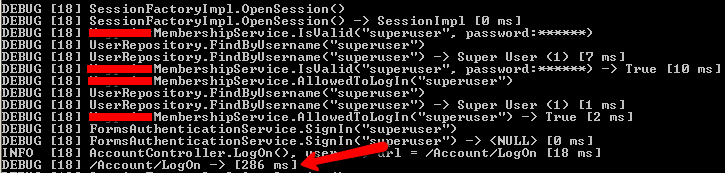
durationmodule

4 Comments  »

  1. tmont says:

    Very nice. This would also be a good spot to send alerts or something if the request duration goes beyond a certain point (like 10 seconds or something). ‘Twould be a nice, no-recompilation-needed way to get notified of times when your server is running slow. Particularly since that’s the precise reason an end-user would start complaining (slow response times).

  2. Asaph says:

    Why not use IIS’s built in functionality to track time taken for an HTTP request to complete:

    http://support.microsoft.com/kb/944884

  3. Michael Valenty says:

    Because I want the information in my application log, not in the IIS server log. I don’t want to correlate timestamps and thread ids to figure out what the application was doing during the slow request.

RSS feed for comments on this post, TrackBack URI

Leave a Comment